
Guide · Drawing
Pixeler Tips and Strategy
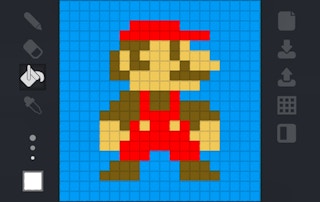
Pixeler
Play nowAdvertisement
Pixeler lets you create artwork using simple tools and challenges you to replicate patterns or complete drawing puzzles.
- Start by selecting the appropriate brush size for the level’s required detail; finer brushes help with intricate sections while larger ones cover broad areas quickly
- Use the undo button frequently to correct mistakes without losing progress, especially when working on symmetrical designs
- Pay attention to the color palette provided; many puzzles rely on matching exact hues, so choose colors before filling large sections
- Utilize the grid or guide lines if available to keep shapes aligned and maintain proportion in complex drawings
- When replicating a reference image, break it down into basic shapes first, then add details layer by layer to avoid getting overwhelmed
- Take advantage of any fill or bucket tool for uniform areas to speed up coloring and ensure consistent coverage
- If the game includes time limits, focus on completing the outline before adding color to avoid rushing the final details
With careful planning and steady use of the drawing tools, you can efficiently complete Pixeler’s challenges and create impressive artwork.
Sponsored
More about Pixeler
Play something similar
See all

Advertisement