Guide · Kids
Toilet Rush Draw To Pee Beginner's Guide - How to Get Started
New to Toilet Rush: Draw to Pee? This guide covers what the game is, how to start, and what a first clear looks like from a real browser session.
What is Toilet Rush Draw To Pee?
Toilet Rush: Draw to Pee is a free browser puzzle with a white rounded playfield, hand-drawn black outlines, and cartoon kids. The page says you guide frantic kids to the nearest bathroom by drawing paths, avoid obstacles and collisions, and finish before time runs out. The menu title reads Toilet Rush: Draw to Pee with a Level 0/85 label. Levels use a yellow cloud-shaped badge. A right-side ad was visible while I played but did not cover the playfield.
First steps
- Open the game and click Ok, Play Now!, then wait through the loading overlay.
- Click the large triangular play button on the menu that shows the game title and level progress.
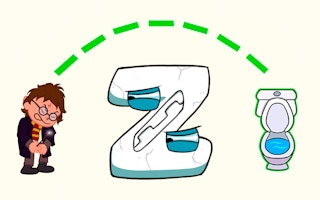
- On Level 1, drag a path from the character to the blue toilet, following the green dotted guide if it helps.
- When Victory appears with +10 coins, choose Next to continue or Retry to try the same level.
- If a later level ignores your drawing, use the gear or back icon to leave rather than repeating the same drag.
Who it's for
It suits players who like short draw-a-path puzzles with cartoon levels. If you need every stage rock-solid, note that Level 2 stopped responding to drawing in my session after Level 1 worked fine.
A first clear from menu to Victory
From the menu I entered Level 1 with one character and one blue toilet plus a green dotted guide. Drawing a direct path produced Victory, a +10 coin icon reward, a progress bar, and Retry and Next. Coins went from 0 to 10.
Level 2 then showed two children and two stalls with gender symbols, but my mouse routes never appeared and nothing moved. I never saw a timer on either level despite the page mentioning time running out.
Gameplay screenshots