Guide · Math
2048 Tips and Strategy
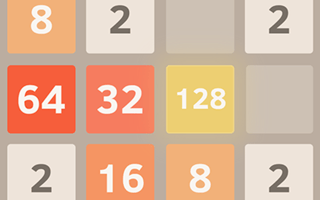
These tips come from a real browser session of 2048 on Pixelsprout, with dozens of arrow-key moves on the 4x4 board. I reached a 512 tile and a score of 5,032 before the board filled. Everything below is what showed up on screen.
- Click OK, PLAY NOW! on the GamePix prompt, then click the board so arrow keys register. Without focus, the tiles stay still.
- Keep empty cells open as long as you can. Matching tiles merge into the next value, and the board gets much harder once most cells are filled.
- Watch the Score and Best counters at the top. Score rises as you merge; Best stays after a loss so you can compare runs.
- Plan merges toward higher tiles rather than scattering pairs. I climbed through mid values up to 512 by chaining matches instead of random moves.
- When the board looks stuck, scan for any two matching numbers that still have a clear path. One merge often frees a cell and unlocks the next move.
- After Game Over, use Try again. That reset Score to 0 while Best stayed at 5,032, so you keep your high mark across runs.
- There was no Undo button in this version. Treat each arrow press as final and think one move ahead when the board is crowded.
2048 rewards patience more than speed. Keep space on the board, chase merges toward one corner of high tiles, and accept that a full board with no moves ends the run.
How the board fills and why that matters
The game starts with two tiles on a 4x4 grid. Each move slides every tile as far as it can in that direction, then a new tile appears. As numbers climb, empty cells shrink and you have fewer places to recover from a bad slide.
In my run the board stayed manageable while I still had open cells, then tightened once higher tiles took space. That crowded endgame is when one wrong direction can lock the grid with no legal move left.
Reading Score and Best during a run
Score tracks the current run and climbs whenever matching tiles merge. Best stores your highest score across resets. After I hit Game Over at 5,032, Try again cleared Score but left Best alone, which made it easy to see whether the next run was improving.
Gameplay screenshots


See it in action
Watch 2048 being played, then try it yourself in your browser.